
Artificial Intelligence (AI) in Laserfiche
Laserfiche Artificial Intelligence (AI) — Put Your Information to Work
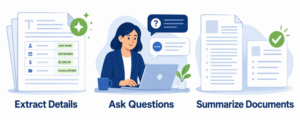
Laserfiche AI helps staff extract information, ask questions about document content, and create summaries. Your documents contain useful information—but finding specific details, entering data, and reviewing lengthy materials can take time.
Start with a practical need: capture key details from an invoice, find an answer in a policy, or review the main points of a lengthy document. Nine Peaks Solutions helps you evaluate where these capabilities fit your work, with appropriate access controls and human review.
Smart Fields — Extract Useful Details
Reduce manual data entry by using Smart Fields to extract information from documents and save it in searchable fields. Describe the information you need in everyday language, such as a vendor name, invoice number, contract expiration date, or employee ID.
Those details can help staff locate records and support automated processes. Nine Peaks Solutions helps define the fields, test them against representative documents, and establish review steps for information that requires verification.
Smart Chat — Ask Questions About Your Documents
Ask questions about document content in everyday language. Smart Chat helps users find specific information and provides answers with references to the source material, making it easier to check the details in context.
For example, ask what a policy says about expense reimbursement or locate a renewal provision in a contract. Staff should review the referenced documents before relying on an answer for an important decision. Nine Peaks Solutions helps identify useful applications and prepare users to evaluate the results.
Document Summarization
Get an initial understanding of longer documents without reading every page first. Laserfiche AI can generate summaries that help staff identify main points and decide where a closer review is needed.
Use a summary to prepare for a discussion, get oriented to a report, or locate topics for further investigation. Summaries support review; they do not replace the original record. Staff should verify important details against the source document before making decisions or sharing information.
Audio & Video Transcription — Make Recordings Searchable
Turn spoken content in audio and video recordings into searchable text. Laserfiche Cloud transcription helps staff locate information in recorded meetings, interviews, and training sessions, then jump to the relevant point in the recording.
For example, search for a project name discussed during a meeting instead of replaying the entire recording. Review important passages against the original audio, especially when sound quality or unfamiliar terminology may affect accuracy. Availability and transcription allowances depend on your selected Laserfiche Cloud plan.
Laserfiche AI Agents — Turn Requests Into Action
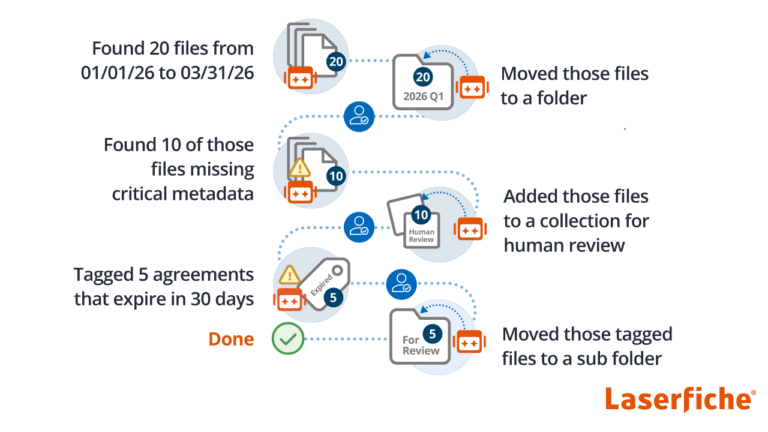
Laserfiche AI Agents extend Smart Chat beyond answering questions by helping users complete approved actions in Laserfiche Cloud. A user can describe a task using natural language, review the Agent’s proposed action plan, and approve the work before changes are made.
Work with Your Repository Using Natural Language
Laserfiche AI Agents can do more than answer questions about documents. Users can interact with the Laserfiche repository conversationally to search for information and perform supported document management tasks.
For example, an AI Agent can help find documents, organize content, update metadata, create collections, and perform multi-step repository tasks using natural-language instructions.
AI-Assisted Forms
Laserfiche AI can also help reduce manual data entry when completing forms. Information from an uploaded document can be identified and used to populate appropriate form fields for the user to review before submission.
Laserfiche AI Agents can help users:
- Search the repository for information using natural language
- Move, copy, and rename documents and folders
- Create folders and shortcuts
- Update metadata and field values
- Add or remove tags and templates
- Organize related documents into personal Collections
- Perform repetitive actions across larger volumes of information
Agents operate within the existing permissions of the user making the request. Actions are recorded in audit logs and attributed to that user, while the review-and-approval step helps keep people in control of the work being performed.
Available AI capabilities vary by Laserfiche deployment, version, and subscription. Nine Peaks Solutions helps confirm which features your environment supports and identify a practical starting point.
Explore Laserfiche AI capabilities on the official Laserfiche website
Request a Demonstration or Consultation
Interested in seeing how Laserfiche could work for your organization?
Contact Us to Learn More
Nine Peaks Solutions is a Laserfiche Solution Provider helping organizations plan, implement, and expand their use of Laserfiche. From document and information management to process automation, records management, integrations, and Artificial Intelligence (AI), we help organizations use Laserfiche to make Your Business. Better!®
Contact us today to discuss Laserfiche.

Don’t leave valuable information behind when you leave a system.
Digital Reclamation™ helps organizations preserve and make accessible valuable historical and compliance information from legacy and retired systems.